Exploring Digital Tools for the Classroom
My job as a Technology Applications and Robotics teacher drives me to constantly discover innovative methods to connect students with digital learning tools. These subjects require technology integration because it promotes the development of problem-solving abilities along with teamwork and analytical thinking skills. Students learn programming and mechanical design concepts through Robotics while Technology Applications teach essential digital skills necessary for their future. The tools I analyzed in this study match my teaching objectives which enables me to strengthen the practical and theoretical components of my curriculum. I plan to build an engaging and effective interactive learning space using digital tools that connect abstract academic ideas with real-world uses for my students.


Tinkercad
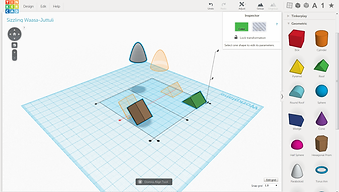
Tinkercad operates as an online service enabling people to produce and prototype digital 3D designs. As a robotics teacher I can use Tinkercad for students to make 3D models of their robot designs prior to building them physically. I started by constructing a basic cube which I then adjusted in size before moving on to combine and position multiple shapes to create complex structures. The more I worked with the platform the more I discovered and began utilizing features like STL file imports and measurement refinement through the ruler tool. Tinkercad helps students learn fundamental engineering and design principles through interactive learning which develops creative thought and problem-solving abilities. Students are able to work together on designs simultaneously which makes this platform ideal for group projects. The platform serves beginners well but does not include advanced features present in professional CAD software that students would need to advance to more complex modeling tasks. Tinkercad operates as an engaging user-friendly platform which successfully connects digital design with physical prototyping even though it has some limitations.

Advantages
-
User-friendly interface, making it accessible to beginners
-
Free to use, with no installation required
-
Integrates seamlessly with 3D printers for prototyping
-
Offers students an exciting introduction to engineering and design concepts through interactive learning
-
The platform provides various pre-designed forms and templates which simplify the design process
-
Real-time collaboration capability makes it perfect for group project work
Disadvantages
-
The creation of complex designs demands extensive processing power which results in system slowdowns on older computers.
-
The program lacks advanced CAD functions which makes it inappropriate for professional modeling work.
-
Users need an internet connection to access the software which prevents offline functionality.
-
The interface might appear too basic for students who work on complex projects.
-
Certain file formats face restrictions when importing and exporting data
Students can learn engineering and design with Tinkercad which provides an easy-to-use 3D modeling environment for hands-on educational experiences. Tinkercad facilitates collaborative efforts and 3D printing capabilities but lacks advanced CAD features and sometimes shows performance problems with older computers. I could see this becoming an issue with the current issue of chromebooks. Students receive effective digital modeling and prototyping education from Tinkercad even though it has limitations.
References
Autodesk. (n.d.). Tinkercad. Retrieved February1, 2025, from https://www.tinkercad.com/
Autodesk Tinkercad. (2018, January 31). How to use Tinkercad for project-based learning. YouTube. https://www.youtube.com/watch?v=zKvl-emwt9Y
Edpuzzle

With Edpuzzle educators can tailor videos by inserting quizzes and notes along with comments in their interactive video-based learning platform. To begin using Edpuzzle I first created an account to explore their vast collection of pre-made lessons. I picked an educational video about robotics and placed multiple-choice questions throughout the video to measure students' understanding of the content. Open-ended questions were added to my Edpuzzle content to promote student critical thinking. When I tested Edpuzzle as if I were a student I discovered that the platform maintained engagement through its requirement for active participation.

Advantages
-
Enhances student engagement with interactive features.
-
Allows real-time tracking of student progress.
-
Offers integration capabilities with Learning Management Systems such as Google Classroom.
-
Supports individualized learning speeds which assists students who learn at different paces.
Disadvantages
-
The free version restricts how much storage is available for videos created by teachers.
-
Certain students face technical problems related to buffering or accessibility.
-
Smooth video playback needs a stable internet connection to work properly.
Edpuzzle enhances video-based learning by adding interactivity and assessment capabilities. Educators who use questions and notes in their materials create an environment where students stay active participants who process information instead of just consuming it passively. Its ability to track progress in real time combined with integration options for other learning platforms transforms Edpuzzle into a seamless digital classroom tool. When deciding to use Edpuzzle across different educational environments it is important to consider its requirements for stable internet connectivity as well as the storage constraints of its free version.
References
Edpuzzle. (2021, November 17). What is Edpuzzle? YouTube. https://youtu.be/msmWfQqVufc
Edpuzzle. (n.d.). Edpuzzle. Retrieved February 1, 2025, from https://edpuzzle.com/

Magic School AI


The educational tool Magic School AI uses artificial intelligence to help teachers create content and plan lessons while keeping students engaged. After registering I tested the lesson creation feature by entering a robotics topic. The educational tool produced organized lesson plans with essential discussion prompts and adaptive interactive tasks for multiple academic levels. I used its AI-powered assessment tool which enabled me to generate quizzes that auto-graded and provided real-time analytics on student performance.
Magic School AI excels in delivering feedback that is customized for each student. I uploaded sample student responses to test the AI feature which produced constructive feedback based on clarity, coherence and subject knowledge. In big classrooms this capability becomes helpful because giving individual feedback takes too much time. The compatibility of Magic School AI with Learning Management Systems (LMS) tools such as Google Classroom and Microsoft Teams makes it simple to add to current educational workflows.
Advantages
-
Generates structured lesson plans and activities efficiently.
-
Provides AI-powered personalized feedback on student responses.
-
Creates auto-graded quizzes with real-time analytics.
-
Magic School AI seamlessly connects with popular LMS systems including Google Classroom.
-
Enhances student engagement through AI-generated interactive activities.
Disadvantages
-
Free version has limited features.
-
Human review is necessary to verify the accuracy of content generated by AI.
-
Lacks the depth of human-driven instructional strategies.
The tool includes powerful capabilities but functions with certain limitations. The free version limits premium feature access and although AI-generated content works quickly it sometimes misses the depth of understanding provided by human teachers. Magic School AI proves beneficial as both a workload reducer for teachers and a personalization enhancer for student learning experiences.
References
Magic School AI. (n.d.). Magic School AI: Smart teaching assistant. Retrieved from https://magicai.com/
MagicSchool AI. (2023, December 7). MagicSchool 3.0 YouTube tutorial. YouTube. https://youtu.be/8dga2tOC_z4
Quizizz

Teachers can use Quizizz to generate interactive quizzes that incorporate game-like elements for students. This platform differs from conventional quizzes because students can learn at their own speed and receive comprehensive reports. During my exploration of Quizizz I developed a robotics quiz incorporating multiple-choice questions alongside true/false and fill-in-the-blank items. The interactive platform design transformed the quiz into a game-like experience which kept students motivated. I activated the "Power-Ups" function to introduce more excitement because it allowed students to earn boosts during the game.
Real-time feedback and performance analytics make Quizizz stand out as a top feature. I tracked student progress in real time while they finished the quiz which allowed me to pinpoint widespread misunderstandings. Assigning quizzes for students to complete as homework turned out to be especially advantageous during remote education. The platform offered many pre-made quizzes that teachers could use for quick lesson supplementation. I discovered that using Quizizz with Google Classroom enabled straightforward student performance tracking and assignment management.


Advantages
-
Gamified learning increases student engagement.
-
Provides detailed analytics for teachers.
-
Allows both live and asynchronous quizzes.
Disadvantages
-
Certain ready-made quizzes need accuracy revisions.
-
Requires an internet connection.
Quizizz operates as an excellent educational application but has some existing limitations. Students using the free version of Quizizz do not have access to advanced reports and question types. The game-like interface of Quizizz can sometimes cause students to prioritize quick responses over correct answers. Quizizz continues to be an effective and interactive platform for formative assessments and review sessions despite its small limitations. Teachers use Quizizz as an interactive platform to design gamified quizzes that make learning enjoyable for students. Traditional quizzes don't offer self-paced learning or detailed reports but this platform provides both features.
References
Quizizz. (2024, October 22). How to teach with the Quizizz Instructional Suite. YouTube. https://youtu.be/v6SiQ76nMA8
Quizizz. (n.d.). Quizizz. Retrieved February 1, 2025, from https://quizizz.com/?lng=en

Miro


Miro functions as an online collaborative whiteboard platform designed for brainstorming activities as well as planning and visual teamwork. After creating an account, I set up a project board for my robotics students and used sticky notes along with flowcharts and images to detail various ideas. My robotics students were invited to contribute by brainstorming project ideas and sharing research links. The instant feedback functionality of Miro’s real-time collaboration feature made it a strong instrument for learning that happened both simultaneously and independently.
I explored additional functions of the mind-mapping tool by creating visual diagrams of programming logic and robotics designs. Embedding documents and adding live links allowed students to combine their research findings in one central location. Miro enabled users to conduct discussions using its video chat and commenting features which did not require separate external software. I tested the voting tool which enabled students to choose project directions.
Advantages
-
Highly interactive and visually engaging for students.
-
Supports real-time collaboration, even in remote settings.
-
Provides users with extensive lesson planning templates to choose from.
-
Encourages creativity and critical thinking.
-
This tool provides interactive elements through video chat options along with commenting and voting tools.
-
Useful for professional development and faculty collaboration.
Disadvantages
-
Users of the free version can only work with a limited number of editable boards.
-
First-time users might find the extensive range of features difficult to handle.
-
Requires consistent internet connectivity for optimal use.
-
Paid plans provide access to certain advanced features which free versions do not offer.
The Miro platform serves multiple purposes as it proves useful not only for student teamwork but also for professional growth. The platform enables users to arrange ideas in visual formats which makes it perfect for faculty meetings and curriculum development as well as interactive training workshops. The tool requires some practice to learn but turns into an essential resource to organize and share ideas after mastering it.
References
Miro. (2025, January 23). What is Miro? Discover the AI-powered innovation workspace! YouTube. https://youtu.be/4C0cJ2BUYJI
Miro. (n.d.). Miro – AI-powered innovation workspace. Retrieved February 1, 2025, from https://miro.com/app/welcome/?requested_url=%2Fapp%2Fdashboard%2F
